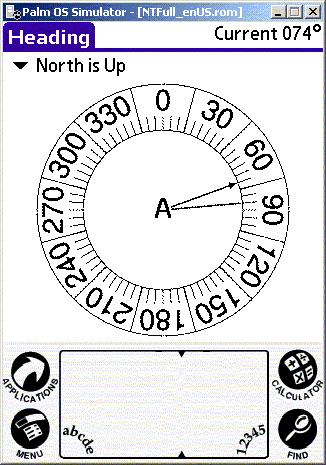
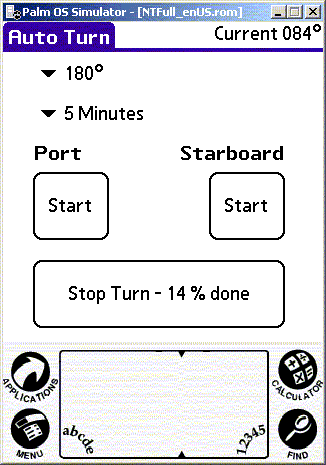
Wireless communications is supported by Arobo, a Bluetooth Palmpilot application supporting a heading display, the ability to quickly and easily switch between automatic and manual modes, steer manually, change desired course, or even execute timed turns (changes in desired heading) such as a “10 minute circle”. See below, left to right, the initial “splash” screen, the heading screen, and the screen for automatic turns
BTW - 'PowerTroll' graphics created by Dave Tackett (www.fisheadtackle.com)
The program is written in Handheld Basic, has a built in simulator and can be installed on any palmpilot (bluetooth is not required for the simulation) and of course it will also work on a normal Macintosh or Windows PC with the palm simulator or palm emulator, both freely available here.
Arobo can also be used "wired" as with an older Palmpilot that supports a serial interface instead of a Bluetooth interface. Palm IIIxe's are often available on Ebay for under $20 and work well. The biggest shortcoming of those old Palm's (besides having to drag around a wire) is lack of backlighting - they can be very hard to read in certain conditions and Murphy will ensure those are the conditions when you want to read it!
Your own remote?
If you don't want to use my remote software (no Palmpilot?) you might want to roll your own. When the configuration switch 2 is set to 'serial' my operational software provides second by second updates of current heading, desired heading, and rudder that are displayed on the acroname console. It also accepts commands written to 'scratchpad' by standard brainstem commands. So typing the following brainstem commands will have the indicated effect:
| 4 51 0 '0' | Set desired heading = current heading |
| 4 51 0 '1' | start/resume auto mode |
| 4 51 0 '2' | stop auto mode |
| 4 51 0 '3' | manual, rudder port 1/2 second auto, desired hdg 5 degrees to port |
| 4 51 0 '4' | manual, rudder starboard 1/2 second auto, desired hdg 5 degrees to starboard |
| 4 51 0 '5' | show eeprom |
Clearly, with the pertinent data being displayed and a way to enter commands, the API you need to write your own remote is present. Documentation for programmatic receipt of console output and sending console commands is available on Acroname's site.